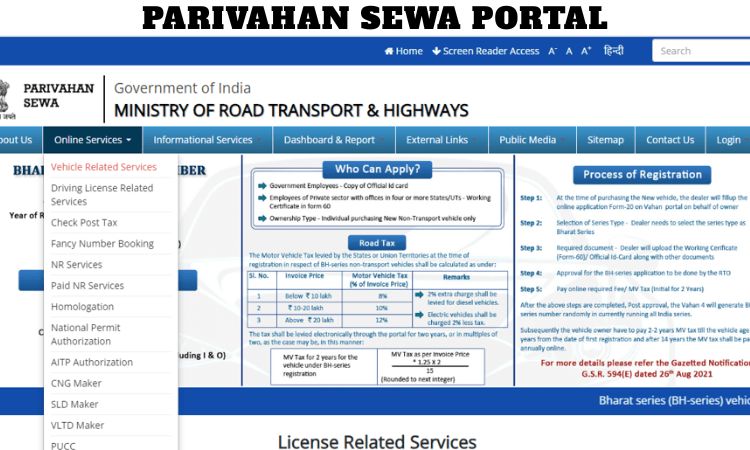
The Parivahan Sewa Portal is a digital initiative by the Ministry of Road Transport and Highways aimed at simplifying transport-related services for citizens across India. With the increasing adoption of online government services, this portal has become an essential platform for vehicle owners, drivers, and transport businesses.
From applying for a driving licence to checking vehicle registration details and paying e-challans, the Parivahan Sewa Portal offers a comprehensive range of services in one convenient location. This article provides a detailed overview of the portal, its features, benefits, services, and step-by-step guidance on how to use it effectively.
Introduction to Parivahan Sewa Portal
The Parivahan Sewa Portal was developed to digitize transport services and reduce the need for physical visits to Regional Transport Offices (RTOs). Traditionally, tasks like licence renewal or vehicle registration involved long queues and complex paperwork. The portal has transformed this process by making services accessible online.
This platform integrates state transport departments into a centralized digital system. It ensures that users can access transport services anytime and from anywhere. Whether you are a first-time driver applying for a learner’s licence or a vehicle owner checking registration status, the portal streamlines the entire process.
Objectives of the Parivahan Sewa Portal
The primary goal of the Parivahan Sewa Portal is to enhance transparency, efficiency, and convenience in transport services. Key objectives include:
- Providing online access to transport services
- Reducing paperwork and manual processing
- Improving data accuracy and centralized record management
- Enhancing road safety through proper documentation
- Promoting digital governance initiatives
By achieving these objectives, the portal contributes significantly to modernizing India’s transport administration system.
Key Services Offered on Parivahan Sewa Portal
1. Driving Licence Services
One of the most popular features of the portal is driving licence management. Users can:
- Apply for a learner’s licence
- Book driving test appointments
- Renew driving licences
- Download digital copies of licences
- Update personal details
The portal also provides detailed guidelines and eligibility criteria, making it easier for applicants to understand the process.
2. Vehicle Registration Services
Vehicle owners can manage registration-related services online, including:
- New vehicle registration application
- Transfer of vehicle ownership
- Duplicate registration certificate requests
- Hypothecation addition or removal
- Registration status tracking
This eliminates the need to visit RTO offices for routine tasks, saving both time and effort.
3. E-Challan and Traffic Violation Payments
The portal allows users to check and pay traffic challans online. By entering vehicle or licence details, users can view pending fines and complete payments digitally.
This feature promotes compliance with traffic regulations and simplifies the penalty payment process.
4. Permit and Fitness Services
Transport operators and commercial vehicle owners can apply for permits, renew fitness certificates, and track application status through the portal. These services are especially useful for logistics companies and transport businesses.
5. National Register Services
The Parivahan system maintains centralized databases for:
- Driving licences
- Vehicle registrations
This helps authorities monitor transport records nationwide and ensures better coordination among states.
Benefits of Using Parivahan Sewa Portal
Convenience and Accessibility
The biggest advantage of the portal is 24/7 accessibility. Users can complete transport-related tasks from home or office without standing in queues.
Time and Cost Savings
By reducing physical visits to government offices, the portal saves time and travel expenses. Online payments also eliminate the need for manual transactions.
Transparency and Accountability
Digital tracking of applications ensures transparency. Users can check status updates in real time, reducing uncertainty and delays.
Environmentally Friendly
Online services reduce paper usage and contribute to eco-friendly governance practices.
How to Register and Use Parivahan Sewa Portal?
Using the portal is simple and user-friendly. Follow these steps:
- Visit the official Parivahan Sewa website.
- Select the desired service such as driving licence or vehicle registration.
- Enter required personal or vehicle details.
- Upload necessary documents.
- Pay applicable fees online.
- Track application status through the portal dashboard.
Users receive confirmation messages and updates regarding their applications.
Documents Required for Various Services
Depending on the service, users may need to provide:
- Identity proof (Aadhaar card, passport, etc.)
- Address proof
- Passport-size photographs
- Medical certificate (for certain licence categories)
- Vehicle purchase invoice and insurance documents
Ensuring correct documentation helps avoid application rejection or delays.
Role in Digital India Initiative
The Parivahan Sewa Portal plays an important role in supporting India’s Digital India campaign. By integrating transport services online, the government promotes digital literacy and encourages citizens to adopt e-governance platforms.
It also helps reduce corruption risks associated with manual processing and middlemen. Citizens can directly access services without intermediaries.
Integration with Mobile Applications
Transport services are also accessible through mobile apps and digital wallets. Digital driving licences and registration certificates can be stored electronically, reducing the need to carry physical documents.
This integration enhances convenience during traffic checks and travel.
Challenges and Limitations
Despite its many advantages, the portal faces some challenges:
- Limited digital awareness in rural areas
- Occasional technical glitches or server issues
- Need for improved multilingual support
- Dependence on internet connectivity
Continuous updates and user education programs can help address these issues effectively.
Future Scope and Improvements
The Parivahan Sewa Portal is expected to evolve with advanced features such as:
- AI-based verification systems
- Real-time traffic data integration
- Enhanced cybersecurity measures
- More user-friendly interfaces
- Expansion of services across all states
These improvements will further strengthen digital transport governance.
Tips for Using the Portal Effectively
To ensure a smooth experience:
- Double-check entered details before submission
- Keep scanned documents ready
- Use secure payment methods
- Regularly track application status
- Save acknowledgement receipts
Following these tips helps avoid unnecessary complications.
Importance for Citizens and Businesses
For individuals, the portal simplifies everyday transport needs such as licence renewal or challan payment. For businesses, especially in logistics and public transport, it streamlines permit management and compliance requirements.
Thus, the platform supports both personal mobility and commercial transportation sectors.
Conclusion
The Parivahan Sewa Portal represents a significant step toward digital transformation in India’s transport sector. By offering a wide range of online services related to driving licences, vehicle registration, permits, and challans, it enhances efficiency, transparency, and user convenience.
Frequently Asked Questions (FAQs)
1. What is the Parivahan Sewa Portal?
The Parivahan Sewa Portal is an online platform launched by the Ministry of Road Transport and Highways to provide digital transport-related services such as driving licence applications, vehicle registration, and e-challan payments.
2. Who can use the Parivahan Sewa Portal?
Any citizen of India who needs transport services like licence renewal, vehicle ownership transfer, or permit applications can use the portal.
3. Can I apply for a driving licence online through the portal?
Yes, users can apply for a learner’s licence, book driving test appointments, renew licences, and download digital copies through the portal.
4. How can I check my vehicle registration details?
You can enter your vehicle registration number on the portal to view registration status, ownership details, and validity information.
5. Is it possible to pay traffic challans online?
Yes, the portal allows users to check pending traffic fines and pay e-challans securely using online payment methods.
6. What documents are required for online driving licence services?
Generally, you need identity proof, address proof, passport-size photographs, and in some cases a medical certificate depending on the licence category.
7. Can I transfer vehicle ownership using the portal?
Yes, vehicle ownership transfer requests can be submitted online along with required documents and fee payment.
8. Is the Parivahan Sewa Portal available on mobile devices?
Yes, the portal is mobile-friendly and transport documents can also be accessed through integrated digital apps and services.
9. How can I track my application status?
After submitting an application, you receive an acknowledgement number that can be used to track real-time status updates on the portal.
10. Are all transport services available online through Parivahan?
Most major services are available digitally, but some processes like physical driving tests or vehicle inspections may still require visiting the Regional Transport Office (RTO).